How Much Does Yuma AI Cost? Pricing, Plans and Resolution Fees Explained
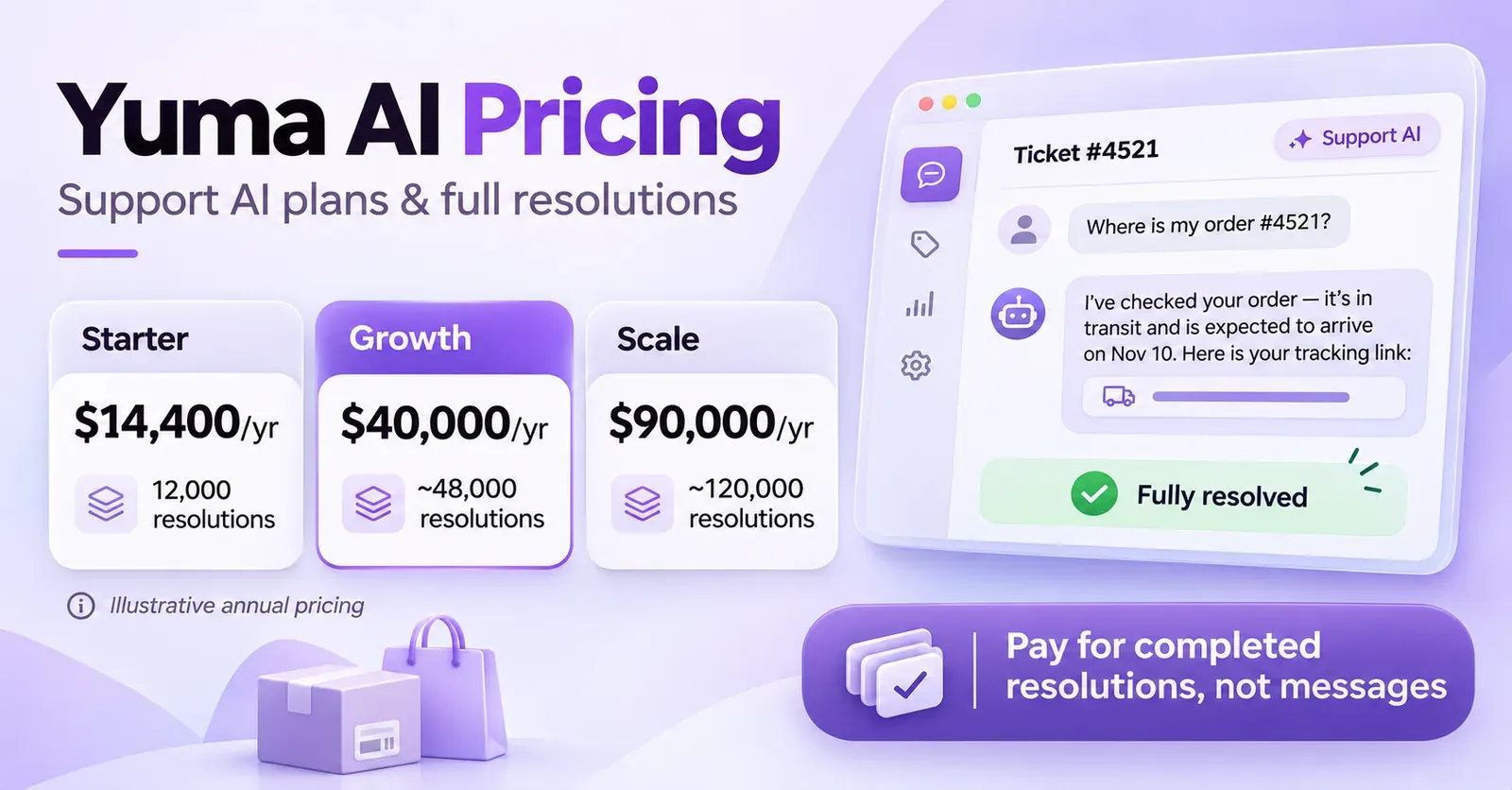
Yuma AI pricing starts at an illustrative $14,400 per year for Starter, which includes 12,000 fully automated support-ticket resolutions. Its published annual examples then rise to $40,000 for Growth, with approximately 48,000 resolutions, and $90,000 for Scale, with approximately 120,000. The company uses outcome-based pricing: a support ticket counts against the plan when Yuma handles it entirely without a human agent stepping in.
There is an important complication. Yuma's Shopify App Store listing also displays Small Merchant at $850 per month and Medium Merchant at $1,200 per month, with unspecified included ticket bundles and possible overages. The app listing and the vendor's annual examples do not provide enough information to establish that these are equivalent subscriptions. Yuma also sells a separate Sales AI shopping assistant, whose price is not publicly specified. The support-resolution prices should not automatically be applied to Sales AI.
In this guide, we'll compare both published pricing presentations, explain what qualifies as a billable resolution, calculate effective costs at different ticket volumes, and cover trials, overages, integrations, and contractual questions. All figures are in US dollars and reflect the vendor's publicly available information reviewed in November 2026. Illustrative calculations are not binding quotes, and taxes, separately contracted modules, and third-party software are excluded unless stated otherwise.
Yuma AI pricing at a glance
| Offer | Published price | Published included usage | Billing and term |
|---|---|---|---|
| Starter | $14,400/year | 12,000 full resolutions/year | Illustrative 12-month commitment |
| Growth | $40,000/year | Approximately 48,000 full resolutions/year | Illustrative 12-month commitment |
| Scale | $90,000/year | Approximately 120,000 full resolutions/year | Illustrative 12-month commitment |
| Higher volume | Custom quote | Over 120,000/year; negotiated allowance | Contract-specific |
| Shopify Small Merchant | $850/month | Automated-ticket bundle, size not published | Shopify monthly listing |
| Shopify Medium Merchant | $1,200/month | Automated-ticket bundle, size not published | Shopify monthly listing |
| Sales AI | Custom quote | Not publicly specified | Separate subscription |
Yuma describes the Starter, Growth, and Scale amounts as illustrative annual prices paid upfront, not as guaranteed self-service subscriptions available to every merchant. The exact bundle is sized around forecasted ticket volume and workflows. Its About page also says annual agreements may be payable monthly or annually, so a negotiated payment schedule should not be confused with the contract's overall duration.
The Shopify prices are equally real, but the listing does not disclose the number of automated tickets included or the applicable marginal rate for those specific subscriptions. As a result, comparing $850 directly with the $1,200 monthly equivalent of Starter would be misleading: the products may have different allowances or commercial terms.
 Quentin Olaya
What is Yuma AI?
Yuma AI is an ecommerce customer-experience automation platform built to work with existing helpdesks and commerce systems. Its Support AI agents can answer customer questions and take actions inside connected tools. Examples include tracking a shipment, checking return eligibility, canceling an eligible order, updating a subscription, or routing a complicated case to a human agent.
Rather than merely generating a suggested response, the product is designed around completing a customer-service workflow. A shipping question might require retrieving an order, checking fulfillment status, looking up carrier data, and sending an accurate update. A return can involve checking store policies, creating a label through a returns provider, and communicating the next steps.
Yuma also markets separate products for sales, social channels, chat, voice, and agent management. This product breadth is useful, but it creates a pricing distinction: the public Support AI resolution bundles are not universal prices for every Yuma module.
The platform usually connects with an existing support setup, such as Gorgias, Zendesk, Kustomer, or another helpdesk. A merchant does not need to assume that Yuma replaces its complete customer-service software stack or makes the helpdesk's own subscription free.
How much does Yuma AI Starter cost?
Starter: $14,400 annually for 12,000 resolutions
Yuma's pricing page presents Starter at $14,400 per year with 12,000 full resolutions. Dividing the annual amount by the included volume produces an illustrative $1.20 per included resolution when the allowance is fully consumed.
Starter is positioned for ecommerce brands beginning to automate their core support inbox. The advertised capabilities include a multi-agent specialist system, brand-voice controls, safeguards, customer-profile personalization, computer vision, Ask Yuma, MCP access for Claude and ChatGPT, multibrand and multistore routing, and Slack support.
A store receiving enough eligible support inquiries to generate roughly 1,000 complete AI resolutions per month would use about 12,000 over twelve months. That makes the example Starter volume a potential fit, but incoming tickets and completed resolutions are not the same thing. If Yuma handles only 50% of incoming tickets completely, the store would need about 24,000 annual incoming tickets to reach 12,000 resolutions, assuming every ticket is eligible for the calculation.
Is Starter $1,200 per month?
The annual amount divided by twelve is $1,200 per month, but this is a budgeting equivalent, not a confirmed cancel-anytime monthly subscription. Yuma's main pricing page states a 12-month commitment and labels its annual examples as paid upfront. Its other materials mention that annual agreements can sometimes be paid monthly, subject to the arrangement.
That means the payment cadence and contractual duration must be addressed separately. Paying twelve installments on a one-year agreement would not necessarily create a right to walk away after a single month.
How much does Yuma AI Growth cost?
Growth: $40,000 annually for around 48,000 resolutions
The publicly illustrated Growth plan costs $40,000 per year and includes approximately 48,000 full resolutions. This works out to about $0.83 per included resolution at full use, or an annual contract value equivalent to approximately $3,333.33 per month.
Growth includes Starter's capabilities and adds a dedicated account and technical manager, Deep Search across ticket history, advanced analytics, quarterly business reviews, and custom integration capabilities as described in the pricing materials. The provider also advertises a target of 30% automation in 30 days, but attaches explicit conditions concerning the merchant's internal processes and how quickly the team can integrate and ramp up.
That percentage should not be presented as a universal contractual guarantee. A business with poor knowledge documentation, unusual order rules, or slow integration approvals may take longer to achieve meaningful automation.
Growth's lower theoretical rate may be attractive when a business consistently has thousands of tickets that can be resolved without human intervention. But paying $40,000 for a bundle makes little sense if only a small share of it will be used. The most valuable input to a purchasing decision is an evidence-based estimate of full resolutions, not merely the total number of emails and chats that arrive.
How much does Yuma AI Scale cost?
Scale: $90,000 annually for around 120,000 resolutions
Yuma's Scale example is $90,000 per year for approximately 120,000 full resolutions, an average of around $0.75 per included resolution at full utilization. Its annual fee is equivalent to $7,500 per month for budgeting purposes, subject to the same annual-contract caveat.
Scale includes Growth's capabilities and adds dedicated solutions engineering, higher-volume pricing, and priority input into Yuma's roadmap. It is aimed at larger brands using automation as a core part of support operations rather than a small experimental workflow.
The tier still has an included-volume figure. Scale is not advertised as unlimited full resolutions for the standard $90,000 illustration. Yuma says volume-based rates can continue decreasing for bundles above 120,000 annual resolutions, with a lower bound advertised around $0.55 per resolution for sufficiently large negotiated volumes.
That $0.55 figure is not a standing per-resolution price available to every merchant. It is a stated potential rate floor associated with larger contracts. The actual rate and total payment depend on a written quote.
What does Yuma AI charge for: full resolutions, not messages
The official meaning of a full resolution
Yuma defines a full resolution as a ticket handled from start to finish by the AI without a human agent becoming involved. The company says the resolution is counted once per ticket, even if the AI performs several actions within the conversation.
Consider a shopper asking where an order is. Yuma looks up the order, retrieves tracking information, explains the latest carrier event, and provides the delivery update. If the issue is fully handled and nobody needs to intervene, this can qualify as one billable full resolution. The number of database lookups or AI replies does not make the same resolved ticket count three or four times.
Conversely, suppose the AI investigates a damaged-item request, writes an initial response, and then a support employee steps in to approve an exception. The ticket was not handled entirely by Yuma. Under the vendor's published definition, a human-touched ticket does not count as a full AI resolution for the standard outcome-based charge.
Does every AI response count toward the plan?
No. The public pricing specifically contrasts full resolutions with ordinary conversations, replies, escalations, and human intervention. An answer generated by the assistant is not automatically a complete resolution. A ticket that requires an employee does not become billable as a full resolution merely because the AI did some preliminary work.
| Activity | Counts as a full AI resolution under the published model? |
|---|---|
| AI independently closes a straightforward tracking inquiry | Yes, if fully resolved |
| AI takes multiple actions to fully complete one ticket | One resolution |
| AI sends a partial answer and hands off to a human | No |
| Human agent edits and finishes an AI-drafted response | No full AI resolution |
| AI classifies or routes a ticket without resolving it | No |
| Customer sends a message but the issue remains open | Not a confirmed resolution |
| Social AI handles a public comment | Separate product rules need confirmation |
| Sales AI recommends a product before purchase | Separate subscription |
What if the customer writes back?
The public description uses a ticket completed by the AI without further intervention as its example. However, it does not publish a universal 24-hour, 48-hour, or seven-day rule for whether a later reply reverses a recorded resolution. A merchant should ask for the exact qualification and reconciliation process if billing disputes, reopen rates, or delayed customer replies are important.
Likewise, a resolution does not mean that every possible action is authorized. Refunds, cancellations, and return approvals still depend on store policies, platform permissions, and the specific Yuma workflows configured for the business.
How much does one Yuma resolution really cost?
Yuma's published averages assume the full annual allowance is used. Because the example packages are committed bundles, a merchant needs to understand the consequences of underutilization.
| Example annual plan | Included resolutions | Published example price | Cost per included resolution at full use |
|---|---|---|---|
| Starter | 12,000 | $14,400 | $1.20 |
| Growth | ~48,000 | $40,000 | ~$0.83 |
| Scale | ~120,000 | $90,000 | ~$0.75 |
If a merchant were to buy the illustrative Starter bundle but use only 6,000 full resolutions during the year, the arithmetic cost of the annual $14,400 commitment divided by actual usage would be $2.40 per used resolution. At 3,000 full resolutions, it would be $4.80. Those numbers assume the contracted fee stays unchanged and ignore any individually negotiated credits, carryover, or remedies. Yuma does not publicly establish a universal refund policy for unused resolutions.
| Actual annual Starter resolutions | Illustrative fixed annual fee | Effective cost per used resolution |
|---|---|---|
| 3,000 | $14,400 | $4.80 |
| 6,000 | $14,400 | $2.40 |
| 9,000 | $14,400 | $1.60 |
| 12,000 | $14,400 | $1.20 |
This is why a trial and accurate ticket forecasts matter. Outcome-based billing can align a usage counter with useful work, while a prepaid capacity commitment still creates underutilization risk. The two ideas are not mutually exclusive.
How do Yuma AI overages work?
Annual bundles: no automatic overage fees
Yuma's main pricing FAQ says that its annual plans do not generate overage charges. When an annual resolution bundle is exhausted, the billable automation usage pauses until the bundle renews, unless the company and customer arrange something else.
That provides a clear degree of spending control but introduces an operational consideration. A merchant depending heavily on automation may need to increase its contracted allowance before a major sales period rather than let the service pause at the bundle limit.
The pause refers to Yuma's covered automation usage. It does not mean that the Shopify storefront or the existing human support helpdesk automatically stops serving customers.
Monthly plans: $1.50 per extra full resolution
Yuma separately advertises $1.50 for each additional full resolution on applicable monthly plans. That is not a price for every AI reply or every escalated ticket. It applies to extra full resolutions beyond the relevant monthly allowance, subject to the subscription's terms.
| Extra full resolutions | Additional usage at $1.50 each |
|---|---|
| 50 | $75 |
| 100 | $150 |
| 250 | $375 |
| 500 | $750 |
| 1,000 | $1,500 |
Do not attach these overage amounts to the example annual Starter, Growth, or Scale bundles, which are advertised specifically as having no annual-plan overage charge.
Do the Shopify plans use the same $1.50 rate?
The Shopify listing says overage fees apply to its monthly Small Merchant and Medium Merchant subscriptions. However, it does not publish a rate per additional automated ticket or state the included quantity. The $1.50 rate on Yuma's general pricing page should therefore not be presented as an automatically confirmed Shopify App Store charge without checking the merchant's billing authorization.
That is particularly important because Shopify also mentions possible additional support fees. A precise budget requires both the included ticket bundle and the authorized variable charges, neither of which is fully described in the public Shopify listing.
Why does Shopify show Yuma at $850 or $1,200 per month?
Yuma's official Shopify App Store listing currently displays Small Merchant at $850 per month and Medium Merchant at $1,200 per month. Both are described as monthly fees including packages of automated tickets, with potential overage charges and additional support fees. Both advertise a 14-day free trial.
These listings are not detailed enough to compare their effective resolution rates with the annual examples. A $850 subscription could be more or less economical depending on how many full resolutions it covers and what happens after that allowance. The public page simply does not disclose those quantities.
| Shopify listing | Base monthly amount | Included automated tickets | Overage rate | Trial |
|---|---|---|---|---|
| Small Merchant | $850 | Not stated publicly | Not stated publicly | 14 days |
| Medium Merchant | $1,200 | Not stated publicly | Not stated publicly | 14 days |
A merchant should check the actual Shopify subscription approval screen, any usage-based spending cap, the definition of an automated ticket for that offer, and whether the plan is part of an older or separate commercial package. It would be incorrect to call Small Merchant the same as Starter or infer that Medium Merchant includes 1,000 resolutions simply because the base fee resembles a particular annual-plan equivalent.
Is Yuma AI pay-as-you-go?
Yuma calls its model outcome-based, and the usage unit is a fully resolved ticket. But the public annual examples include a 12-month commitment and a defined bundle of resolutions. This is not the same as a purely usage-based service with no minimum commitment where a merchant owes only a few dollars if very few tickets are resolved.
Monthly offers may involve ongoing usage charges after a specified bundle, but the Shopify listing does not fully describe their allowances. The best description is that Yuma sells committed resolution capacity with outcome-based counting, with different overage behavior depending on the contract.
 Quentin Olaya
An example based on incoming support tickets
Suppose an ecommerce store receives 2,000 support tickets per month, or 24,000 per year. If Yuma fully resolves 50%, that produces about 12,000 annual full resolutions. If it fully resolves only 25%, that produces 6,000. If it reaches 75%, the result would be 18,000.
Those rates change both the amount of capacity used and the overall value of automation. The number of tickets touched or partially drafted by the AI does not replace the full-resolution count.
| Annual incoming tickets | Hypothetical complete automation rate | Annual full resolutions |
|---|---|---|
| 12,000 | 50% | 6,000 |
| 24,000 | 50% | 12,000 |
| 60,000 | 50% | 30,000 |
| 96,000 | 50% | 48,000 |
| 240,000 | 50% | 120,000 |
These are illustrative mathematical scenarios, not predicted results for a particular merchant. The actual automation rate depends on the complexity and eligibility of the incoming requests, the connected systems, the quality of policies, and the stages of rollout.
Does Yuma AI offer a free plan?
The official public materials advertise a free trial, not a permanent $0 production tier that every merchant can keep using. Yuma's main website promotes a 30-day free pilot in which the team connects the customer's existing helpdesk and works on real tickets.
The Shopify App Store, however, displays a 14-day free trial on its two monthly subscriptions. Both statements originate from official channels; they should not be silently combined into a universal 30-day Shopify trial.
A merchant requesting a sales-led pilot should confirm whether the full 30 days are available, what targets will be measured, and what the conversion to a paid contract requires. A merchant installing directly through Shopify should rely on the trial period shown in that app subscription flow unless separate written terms provide otherwise.
What happens during Yuma's trial?
Yuma says its team handles setup, connects the merchant's helpdesk and ecommerce tools, and starts automation gradually. The company describes launching new workflows on a small share of eligible tickets, then expanding as confidence increases. This gives merchants a chance to review answer accuracy, real automation rates, exception handling, and the effect on human workload before a larger rollout.
The trial should be used to measure full resolutions, not merely the number of draft replies the system produces. It is also a good time to ask about the definition of resolution, the handling of reopened cases, and the impact of sensitive workflows such as refunds and address changes.
Is there a Yuma AI setup or implementation fee?
Yuma's main pricing page clearly advertises no standard implementation fee and says onboarding and integration assistance are included. It also says the first 30 days are free for its primary sales-led trial. The FAQ describes a dedicated account team, rather than a purely unsupported self-service installation.
That is useful for larger support operations because the initial work can involve knowledge review, policy configuration, workflow testing, and connection to several ecommerce services. The provider also advertises specialist support during rollout.
However, custom integrations are separately listed as add-ons with pricing based on scope. The Shopify App Store also notes that additional support fees may apply. Therefore, the accurate claim is that standard onboarding has no published implementation charge, not that every bespoke integration, unusual migration, or professional service is unconditionally free.
Does Yuma charge per human support agent?
Yuma says its own platform does not charge per seat or per human support agent. Its public model is based on full resolutions, so simply adding staff members to the customer's team does not create an ordinary Yuma seat charge.
That does not mean the merchant's entire customer-service stack has no seat costs. If employees use Gorgias, Zendesk, or another helpdesk, that provider may charge separately for its seats, tickets, or AI features. Yuma's no-seat-pricing statement applies to Yuma's own billing, not every connected vendor.
A realistic total-cost comparison should distinguish Yuma's subscription, helpdesk charges, employee costs, messaging infrastructure, and any outside services. It should also consider savings from fewer repetitive cases reaching employees, not just the gross number of tickets the AI processed.
Is Yuma Sales AI included in the support subscription?
No inclusion is established by the public Support AI pricing. Yuma's pricing page explicitly lists Sales AI as an add-on that runs on its own subscription. It is an ecommerce shopping assistant that helps visitors choose products, asks relevant questions before checkout, and can recommend items based on catalog information.
This distinction is especially important when comparing Yuma with Shopify shopping assistants priced by visitor, chat session, or AI reply. The public $14,400 Starter example covers a Support AI resolution bundle, not a complete published price for putting Sales AI on a storefront.
Yuma's FAQ says Sales AI pricing is discussed on a demo after reviewing the merchant's traffic and use case, and that its commercial results may be assessed through controlled tests. No standard monthly Sales AI price, usage quota, or revenue commission rate is confirmed in the reviewed public information.
What can Sales AI do?
Yuma describes storefront product advice, personalized recommendations, and handoff to human staff when a shopper needs judgment or an exception. It advertises compatibility with Shopify and other storefronts that support custom scripts. The actual scope depends on data connections and configuration.
Its published case-study claims about revenue per visitor and conversion rate are marketing results from particular customers, not guaranteed improvements for every brand. They also do not establish the subscription price.
What about Social AI, Chat AI, and Voice AI?
Yuma's broader product lineup includes Social AI for public comments and direct messages, Chat AI for conversational help on the storefront, and Voice AI for phone support. The company markets shared policies and integrations across its platform, but not every product uses the same publicly documented billing arrangement.
Social AI can classify and reply to messages or comments according to configured rules. Chat AI can handle questions and, in some cases, support workflows involving orders or returns. Voice AI can answer calls and use back-office data under the merchant's policies.
The public Starter, Growth, and Scale resolution illustrations should not be repurposed as fixed fees for voice calls, Instagram comments, SMS messages, or shopping recommendations. Obtain separate product-specific terms whenever those channels are central to your implementation.
Are custom integrations included?
The main pricing page highlights a large library of ready-made integrations but also lists custom integrations as a separately scoped add-on. Growth includes custom integration capabilities in its feature summary. Both can be true if standard integration scope is included and bespoke work beyond it is charged separately.
For a practical purchasing decision, request a statement listing every connector included in your quote and any additional implementation or maintenance fee. The phrase custom integrations alone does not confirm that all future development work is unlimited.
Which Yuma AI features come with Starter, Growth, and Scale?
The vendor's public comparison emphasizes progressively more assistance and analytics at higher volumes.
| Feature | Starter | Growth | Scale |
|---|---|---|---|
| Fully automated support workflows | Included | Included | Included |
| Specialized AI agent system | Included | Included | Included |
| Brand voice and policy guardrails | Included | Included | Included |
| Customer-profile personalization | Included | Included | Included |
| Computer vision | Included | Included | Included |
| Ask Yuma | Included | Included | Included |
| MCP integration with Claude and ChatGPT | Included | Included | Included |
| Multi-brand and multi-store routing | Included | Included | Included |
| Slack support | Included | Included | Included |
| Deep Search across historical tickets | Not listed | Included | Included |
| Advanced analytics | Not listed | Included | Included |
| Dedicated account and technical management | Not listed as this tier's differentiator | Included | Included |
| Quarterly business reviews | Not listed | Included | Included |
| Dedicated solutions engineering | Not listed | Not listed | Included |
| Priority roadmap input | Not listed | Not listed | Included |
The published feature table is a commercial summary, not a full technical specification. Not listed means a benefit is not established as a standard entitlement in that tier's description; it does not preclude a separately negotiated arrangement.
Support workflows and safeguards
Yuma emphasizes policy controls, customer-context checks, and handoff for cases requiring human judgment. This is particularly important for refunds, subscriptions, and order modifications. A workflow may be possible in theory but still require the merchant to authorize it and define appropriate restrictions.
Multi-brand and multistore use
The Starter list includes multibrand and multistore routing, and the company says it does not add ordinary per-seat fees. That is not equivalent to unlimited accounts, unlimited stores, unlimited channels, and unlimited full resolutions under any contract. The resolution bundle and scope of included services remain relevant.
Does Yuma replace Gorgias, Zendesk, or Kustomer?
Yuma is designed to work with existing helpdesks. It integrates with software such as Gorgias, Zendesk, Kustomer, Salesforce Service Cloud, Gladly, Re, Front, and others. The merchant's staff continue using the helpdesk, while Yuma automates eligible tasks and escalates difficult cases with conversation context.
This can reduce disruption because a business may not need to migrate all its customer-service processes to a new inbox. But the financial effect is that the original helpdesk subscription may remain payable.
For example, if a company pays Gorgias for human support and Yuma for autonomous resolution, it needs to model both vendor charges. If Gorgias uses a ticket-based or seat-based billing element, Yuma's resolution fee is not a substitute for that charge. The same caution applies to Zendesk, Kustomer, and other integrated platforms.
Ecommerce integrations can also involve Shopify, subscription applications, returns providers, shipping systems, loyalty services, and marketing tools. Their existence in Yuma's integration catalog does not make each third-party product free.
How to calculate whether Yuma AI is worth the price
The most useful financial approach is to estimate how many tickets Yuma will fully resolve, what those resolutions save, and whether a committed annual bundle is likely to be used.
Suppose handling an eligible ticket through a human agent costs the business $4.50 in fully loaded variable and avoidable expenses. If Yuma fully resolves that ticket at an effective cost of $1.20, the theoretical direct cost difference is $3.30 per ticket before integration, supervision, helpdesk fees, and other expenses.
However, avoid assuming that every unit of human labor expense disappears instantly. Some agent time may be redeployed rather than removed. Some cases need human review or quality control, and helpdesk costs can remain. Calculate real savings against a baseline, not merely hypothetical staff-hour reductions.
Example: a Starter-sized support operation
A business receives 24,000 annual support tickets. Suppose half are completely resolved by Yuma: 12,000 full resolutions. The illustrative Starter bundle would be fully utilized at $14,400 for the year.
If the business really avoids $3 of eligible labor and operating cost per completed ticket, that would imply $36,000 in gross operational savings against the $14,400 Yuma fee, before other differences. But those assumptions are hypothetical. The observed automation rate, baseline cost per ticket, and actual avoidable expenses must be measured during a pilot.
Why a high automation percentage may not mean a high ROI
A store can automate a high percentage of trivial, inexpensive tickets while still retaining costly complex cases. Another business may automate fewer tickets but save substantial effort on each one. The quality of automation also affects refunds, retention, and satisfaction.
The important numbers are not only automation rate, but also the cost of qualifying resolutions, the amount of work actually removed, the rate of mistakes or escalations, and the effect on customers. An annual bundle that is half used may have a very different effective unit cost than the advertised full-use average.
 Quentin Olaya
What ROI and automation claims does Yuma make?
Yuma publicizes results such as 89% automation for EvryJewels, 3× ROI for Clove, and substantial cost reductions in selected customer stories. It also cites a conditional target of reaching 30% automation in 30 days for its Growth tier, subject to a realistic rollout timeline agreed during onboarding.
These are provider-reported case studies or marketing goals, not universal guarantees. Outcomes will vary with ticket mix, order policy complexity, historical data, integrations, and the merchant's capacity to review new workflows.
Yuma also mentions a 100% ROI guarantee in its FAQ. The public wording does not establish an unconditional full cash refund, a precise calculation methodology, or every remedy available if the result is not met. A company should request the actual contract language covering the ROI metric, measurement period, exclusions, and obligations of both parties before treating it as financial insurance.
What are Yuma AI's cancellation and renewal terms?
The main pricing page says Starter, Growth, and Scale involve a 12-month commitment. The examples are presented as annual prices paid upfront, though other Yuma materials say negotiated annual agreements may be payable monthly or annually.
That confirms the length of the standard commercial commitment, but public information reviewed does not establish a universal early-cancellation right without penalty, a universal refund for unused resolutions, or an exact notice period for every agreement. Those topics belong in the individual contract.
The same caution applies to credit carryover. Yuma does not publish a blanket promise that unused full resolutions automatically roll into a second year, nor does the public pricing establish that they are refunded in cash. Ask how remaining credits, future changes in ticket volume, downgrades, and renewal rates will be treated.
Trial terms are not the same as contract terms
A 30-day pilot can help a merchant decide whether the product works. It is not proof that a paid annual agreement becomes freely cancelable every thirty days. Likewise, the Shopify listing's 14-day trial does not guarantee the same terms as a sales-led 30-day evaluation.
A procurement review should identify exactly when paid service begins, how the contract renews, whether usage caps pause automation, and what remedies apply if performance or availability falls below agreed expectations.
Are there hidden costs with Yuma AI?
Yuma's public model is transparent about the main billing unit and states that ordinary onboarding and Yuma seats do not add charges. Nevertheless, a complete budget may include several separate components.
| Cost or limitation | Current public position |
|---|---|
| Starter, Growth, Scale | Illustrative annual committed bundles |
| Annual overages | Not billed; usage pauses at exhausted bundle |
| Monthly overages | $1.50 per extra full resolution on applicable monthly plans |
| Shopify overage rate and allowance | Not specified in public listing |
| Standard onboarding | No published implementation fee |
| Yuma staff seats | No ordinary per-seat charge |
| Helpdesk licenses | Third-party charges may remain |
| Custom integrations | May require scoped pricing |
| Sales AI | Separate subscription, price on demo |
| Social AI and Voice AI | Product-specific quote and scope needed |
| Unused annual resolutions | No universal carryover or refund promise confirmed |
| Taxes | May apply |
The most significant cost risk may be capacity planning, not an undisclosed AI-message fee. Overestimating the annual volume can result in a high cost per resolution actually used. Underestimating volume may force a contract adjustment or cause annual automation usage to pause when the bundle is exhausted.
How to choose the right Yuma AI plan
1. Start with real helpdesk ticket history
Measure annual ticket volume, reasons for contact, and the percentage of issues that could reasonably be resolved through connected systems without an exception. Distinguish simple order-status requests from complex disputes, refunds requiring judgment, and issues involving outside parties.
2. Estimate full resolutions rather than AI-assisted replies
A ticket drafted by the AI and completed by an agent does not count as a full Yuma resolution under the published model. Your forecast should focus on which cases the assistant can actually complete end to end. The provider's pilot is useful for measuring this rather than relying entirely on assumptions.
3. Confirm the contract and overage arrangement
Ask whether you are being offered an annual example bundle, one of the Shopify monthly plans, or a custom contract. Get the included volume and full-resolution definition in writing. Check what happens if the bundle is exhausted and how unused capacity is treated.
4. Separate Support AI from the sales experience
If your primary objective is guiding pre-purchase customers, ask specifically for Sales AI pricing. A support-ticket resolution quote is not a substitute for pricing an on-site shopping agent, and published examples do not confirm that Sales AI is bundled for free.
5. Include the rest of the support stack
Model helpdesk subscriptions, existing agent costs, third-party integrations, and any paid custom development. Consider customer experience and operational continuity alongside the nominal price per resolution.
Frequently asked questions about Yuma AI pricing
How much does Yuma AI cost per month?
Yuma's main website gives illustrative annual plans starting at $14,400 a year, equivalent to $1,200 per month when divided by twelve, but subject to a 12-month agreement. Its Shopify listing also shows $850/month Small Merchant and $1,200/month Medium Merchant, with undisclosed ticket allowances.
Is there a free Yuma AI plan?
A permanent $0 production plan is not established by the current public pricing. Yuma promotes a 30-day free trial through its main website, while Shopify lists a 14-day trial on its two monthly offers.
Does Yuma charge per AI reply?
No. The main Support AI pricing is based on full ticket resolutions: tickets handled end to end without human intervention. It does not publish a separate standard fee for each AI-generated reply.
Do human escalations cost a Yuma resolution credit?
Under the public definition, a ticket that a human agent touches is not a full AI resolution. That does not remove human labor costs or other helpdesk charges.
How much is Yuma AI Starter annually?
The illustrative Starter example is $14,400 per year for 12,000 full resolutions, or $1.20 per included resolution if the whole bundle is used. It is not automatically a self-service $1,200 cancel-anytime monthly contract.
How much are Yuma AI overages?
The main website says annual bundles have no overage charges and pause usage at the limit. Applicable monthly plans can charge $1.50 per extra full resolution. Shopify's own listing mentions overages but does not publish its exact rate or allowance.
Does Growth include unlimited resolutions?
No. The public example is approximately 48,000 full resolutions per year for $40,000. The exact allocation can vary in a customized proposal.
Does Scale include unlimited resolutions?
No. The illustration covers approximately 120,000 resolutions per year for $90,000. Higher-volume pricing is negotiated, with Yuma advertising rates that can decline toward $0.55 per resolution at sufficient scale.
Does Yuma charge per support-agent seat?
Yuma says it does not charge its own fees per agent or seat. Separately licensed helpdesks may still have seat, ticket, or platform charges.
Is onboarding included?
Yuma advertises no standard implementation fee and provides assisted onboarding. Bespoke connectors or unusual services can be subject to additional scope or pricing, and Shopify mentions possible additional support fees.
Is Sales AI included in Starter?
The published pricing page says Sales AI has its own subscription. Its exact fee is discussed after reviewing the merchant's traffic and use case, so the Support AI Starter price should not be presented as a Sales AI quote.
Does Yuma replace Zendesk or Gorgias?
Yuma generally integrates with existing helpdesks rather than requiring a full replacement. The merchant may therefore keep paying the original helpdesk provider separately.
Can I cancel after one month?
The main annual example plans have a 12-month commitment. Public information does not confirm a general right to end such an agreement after one month without penalty. Verify the actual signed terms.
Does the 100% ROI guarantee mean a full refund?
Not necessarily. Yuma references an ROI guarantee but does not publish a complete universal cash-refund formula in the reviewed materials. Contract-specific measurement and remedies must be confirmed.
Is Yuma suitable for Shopify shopping recommendations?
Yuma offers Sales AI, a separate product focused on pre-purchase assistance and recommendations. It is relevant to ecommerce shopping, but its public price is not the same as the published Support AI resolution bundles.