How to Train Rep AI with Shopify Store Data: Knowledge Base, FAQs, and Testing
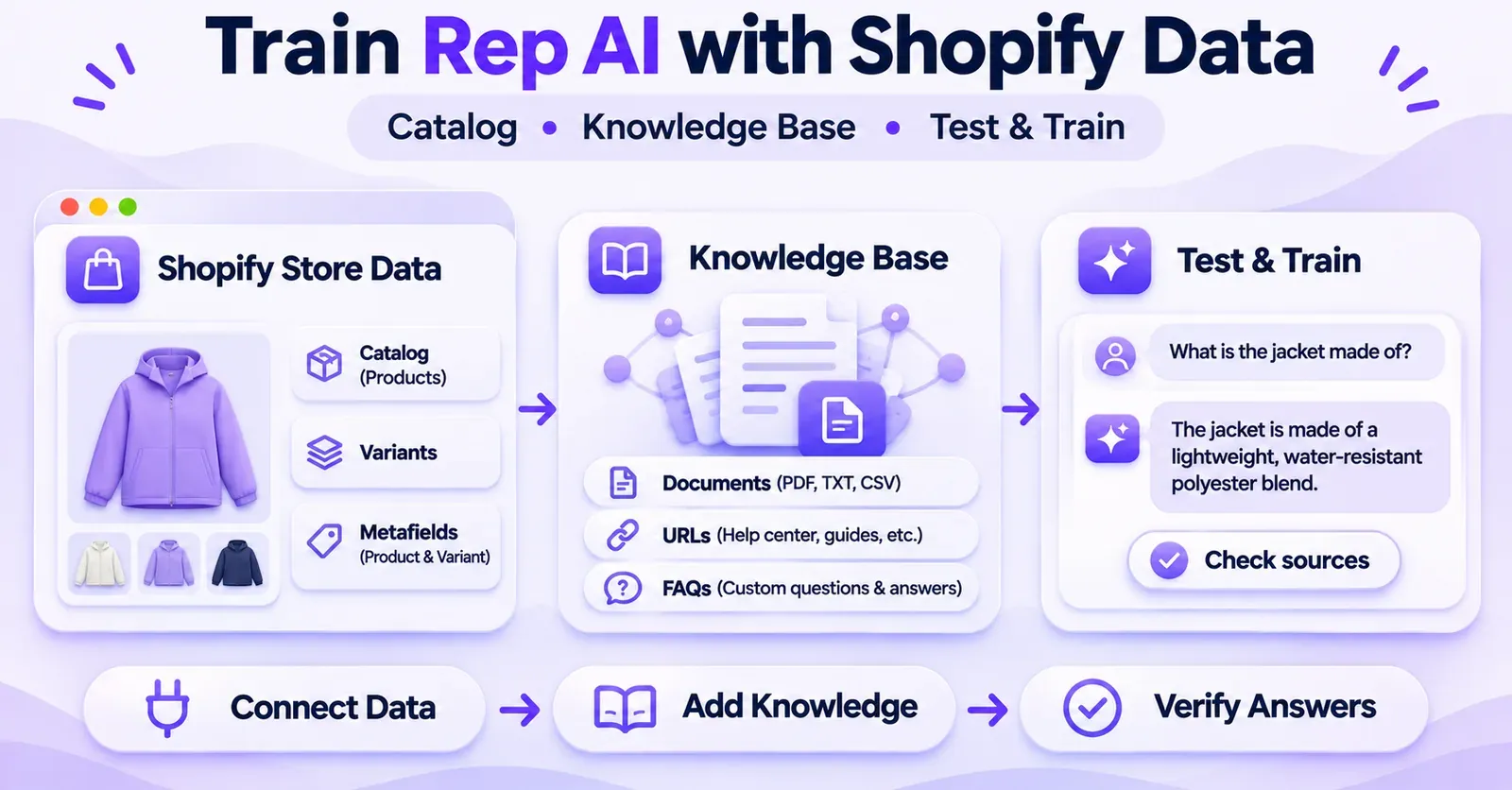
If you want Rep AI to give better answers about your Shopify products, you usually do not need to upload your entire product catalog or train an AI model from scratch. Rep AI connects to Shopify and uses synchronized product and store information. Your main job is to make that information accurate, add knowledge the catalog does not contain, and test whether the assistant can retrieve the correct facts when shoppers ask questions.
The practical process is straightforward: verify your Shopify data, enable relevant product and variant metafields, add focused knowledge sources, create Custom FAQs for important questions, configure appropriate instructions, and check the results in Test & Train. When a response is wrong, investigate the source before adding yet another instruction.
This guide explains that process in detail, including the documented limits of Rep AI's knowledge features, Google Docs and Sheets requirements, and a pre-launch testing checklist. It is for merchants who already have Rep AI connected to a Shopify store; it is not a guide to installing the app or engineering a custom language model.
What Does “Training Rep AI” Actually Mean?
The word training can make the setup sound more technical than it is. In Rep AI's merchant-facing interface, the relevant tasks involve supplying and maintaining information the assistant can use when it responds to customers. The documentation describes synchronized store data, a Knowledge Base, explicit question-and-answer entries, instructions, and tools for reviewing the sources behind a response.
This is different from performing machine-learning fine-tuning yourself. Adding a size chart, writing a FAQ, or editing a product description does not establish that Rep AI has retrained the underlying model's weights. What you can control is the factual material and guidance made available to the assistant—and you can check whether a test answer reflects them.
The three layers of useful knowledge
Think of your setup in three layers:
- Shopify as the source of truth. Products, variants, relevant catalog attributes, collections, and current store information form the foundation. A fictional delivery promise in an AI instruction cannot replace a real shipping policy.
- Rep AI's supplemental Knowledge Base. File Sources, URL Sources, Custom FAQs, and Promotions add context that may be missing or hard to interpret from the catalog alone.
- Review and improvement. Test & Train, source inspection, corrections, and conversation insights help you discover gaps and remove outdated or contradictory material.
The goal is not to create as many documents as possible. It is to make a smaller collection of dependable, well-scoped information available at the point of need.
| Need | Best starting point | What to verify |
|---|---|---|
| Product color, price, or available variant | Shopify catalog | Correct store, product, and current variant values |
| Material or specification stored in custom data | Shopify metafields | Correct definition, supported type, activated field |
| Detailed sizing or care guide | Product page or File Source | Readable text and correct product relevance |
| Shipping or returns policy | Current store policy or URL Source | Latest terms and geographic exceptions |
| One recurring question with a precise answer | Custom FAQ | Accurate wording and no conflicting entries |
| Limited-time offer | Promotions | Active dates, eligibility, and real Shopify code when required |
| A questionable answer | Test & Train | Response, displayed Sources, and follow-up test |
Step 1: Check the Shopify Store and Its Existing Catalog
Before creating a new knowledge document, establish what Rep already knows. An assistant can sound uncertain simply because the store connection is incomplete or because the source product data is unclear.
Confirm the correct Shopify connection
Open Rep AI Console and review the Shopify connection under Settings → Integrations → Catalog → Shopify. The documentation describes a connection flow in which the merchant selects the Shopify store and authorizes permissions. If the store is already connected, verify its identity and status instead of reconnecting or reinstalling without a reason.
Next, open AI Sales → Catalog → Products and confirm that representative products appear. Choose more than one type of product: for example, one simple item, one item with multiple sizes, and one with unusual specifications. This is a basic knowledge audit, not a guarantee that every future question will be answered correctly.
A connected storefront does not, by itself, prove that all data sources or actions work. Likewise, a product appearing in the catalog does not prove that every custom Shopify field is readable. We will check those separately.
Improve what the Shopify product page actually says
Start with the fields a merchant can verify directly:
- Is the product title clear enough to distinguish similar items?
- Does the description identify the material, use case, and important limitations?
- Are sizes, colors, and option names consistent with the actual variants?
- Are prices and availability maintained in Shopify rather than copied into aging instructions?
- Does a collection or product page make a policy claim that conflicts with the current policy page?
- Are you asking the AI to infer technical specifications that were never entered anywhere?
Consider a fictional clothing store selling a jacket called the Harbor Shell. Its Shopify description says only “comfortable all-weather outerwear.” A shopper asks whether it has taped seams. If that property is not documented, an authoritative-sounding yes is not a good answer. Update the product information if the fact is known and approved; otherwise, the assistant should express uncertainty and offer help rather than guess.
Treat this as a content-quality exercise. Rep documents how it uses product titles, descriptions, and option names, but it does not provide a universal formula promising that any single field will make every recommendation or answer correct.
 Quentin Olaya
Audit the policies that live outside product data
Catalog data cannot explain everything. A customer might ask whether an opened item is returnable, whether international shipping is offered, or how a warranty exclusion works. Those facts may live in a shipping page, a returns policy, a Help Center article, or a merchant-maintained document.
Check the current, customer-facing version first. Then decide whether Rep needs a dedicated URL Source, a concise File Source, or a Custom FAQ. If the same policy appears in several places, correct the outdated copy before duplicating it in Rep.
Some older Rep documentation discusses which site pages are included in automatic crawling differently from newer general Knowledge Base guidance. Do not assume every blog post, dynamically rendered page, or private area is indexed. For business-critical content, add the specific page as a source when appropriate and verify its use in testing.
Step 2: Use Shopify Product and Variant Metafields for Missing Details
Shopify metafields can be particularly useful when shoppers ask questions that ordinary product descriptions cannot answer. Rep AI supports both product metafields, whose values apply to an entire product, and variant metafields, whose values differ between options.
Examples include materials, care instructions, compatibility information, dimensions, pack quantities, and restock information. The distinction matters. If a medium jacket has different measurements from an extra-large jacket, putting a single length in a product-level field may mislead a shopper asking about XL.
Activate selected metafields in Rep AI
The documented workflow is:
- Open AI Sales → Catalog in Rep AI Console.
- Select the Product Metafields tab.
- Review the Product fields and Variant fields sections.
- Activate the definitions you want Rep to use.
- Click Save and allow the catalog to synchronize the newly selected values.
- Open a representative product under Catalog → Products and check its details. For variant values, inspect the Variant metafields table.
Rep's published limit is up to 10 activated product fields and up to 5 activated variant fields, counted separately. A variant field does not consume one of the product-field slots. If your account already has more fields enabled from an earlier configuration, its behavior may differ when you attempt to activate additional fields; the documented procedure is to free capacity before adding more.
Only Shopify metafields with proper definitions appear in Rep's list. If a field is missing, check Shopify Admin → Settings → Custom data and the appropriate Product or Variant definition. New definitions may require a catalog synchronization before they appear in Rep. Rep also documents a Sync Now option on the catalog page.
Select fields based on real customer questions
Do not activate ten arbitrary product metafields simply because ten slots exist. Build your selection around recurring shopper questions.
| Shopper question | Appropriate source | Test focus |
|---|---|---|
| “What is this made from?” | Product-level material field | Exact composition, not a guessed synonym |
| “Does the large size have a different length?” | Variant-level dimension field | The selected size, not the default |
| “How many units come in the blue pack?” | Variant-level units-per-pack field | Correct color and pack |
| “Can I use it with device model X?” | Defined compatibility data | Qualified compatibility, no extrapolation |
| “When will size XL return?” | Relevant verified restock field | Avoid inventing dates if empty |
Rep lists supported variant metafield types including text, lists of text, whole and decimal numbers, boolean values, dates, colors, URLs, ratings, and measurements with units. Its documentation also warns that rich text, money, JSON, file, and reference metafields do not provide usable values through the variant-field route, even if a field appears in the selection interface. A visible field is not necessarily a readable field.
For a unit price or specification, use a supported type as appropriate for your Shopify setup. Do not assume a money-typed variant metafield will behave like Shopify's actual product price.
What metafields do not do
This limitation is essential: Rep uses metafields to answer questions about products; its Product Finder does not use those metafields as general product-search filters. Search and discovery rely on information such as product titles, descriptions, and option names.
For example, a variant metafield might allow Rep to answer “What is the coverage per box for the charcoal tile?” That does not mean Product Finder can reliably find every tile costing less than a particular price per square foot solely by filtering that metafield. Product cards still use the Shopify price.
If the merchant's requirement is advanced catalog filtering, test the exact desired experience rather than assuming that adding a metafield turns Rep into a custom search engine. Catalog synchronization and product-discovery behavior deserve their own technical validation.
Step 3: Add Useful Documents to the Knowledge Base
For information that does not fit naturally on product pages or in Shopify fields, use Rep's Knowledge Base. Its documented sections include File Sources, URL Sources, Custom FAQs, and Promotions. Each has a different purpose.
File Sources are appropriate for text-based documents such as a care guide, a concise warranty policy, a technical specification sheet, or a collection-specific size guide. The officially documented formats for Knowledge Base → File Sources are PDF, TXT, and CSV.
Upload a File Source
- In Rep AI Console, open AI Training → Knowledge Base.
- Select File Sources.
- Click File Upload and choose the document.
- If the content is relevant only to certain product pages, check the optional Only relevant to specific product pagessetting and select those products.
- Click Upload.
- Test a question that should use the new material and inspect the answer's sources.
The Rep help guide recommends keeping File Sources concise—roughly five or six paragraphs, or fewer than about 800 words—and focusing each file on a single topic. This is content preparation guidance, not a demonstrated universal hard stop at word 801.
A useful approach is to split a lengthy “Store Operations Handbook” into narrower documents such as “Winter Jacket Care,” “Footwear Size Conversions,” and “Warranty Exceptions.” This makes sources easier to check and update. If one file changes, you know which questions should be retested.
Readable text matters more than a polished PDF
A document may look excellent to a human but be a poor knowledge source if all its important information exists only as images. Rep's File Sources documentation says the AI cannot read images or videos within those files. Do not assume a scanned PDF, an embedded diagram, or a screenshot-only size chart will be interpreted correctly.
Convert important facts into selectable text where possible. For a size chart, include meaningful labels, measurements, units, and definitions. For compatibility rules, explain what each model number refers to. Avoid uploading documents that contain confidential staff notes, payment credentials, customer exports, or other sensitive information irrelevant to shoppers.
Another common confusion: Rep's Email Test & Train simulator supports some attachment formats beyond PDF/TXT/CSV. That does not mean the same formats are accepted as permanent File Sources in the Knowledge Base. Treat the two features as separate.
Decide when a product-specific File Source helps
Suppose your store sells a particular camping tent that requires unusual care instructions. A generic global FAQ may give an answer intended for another product. A focused tent-care document scoped to that product page is easier to evaluate. Test the same question on the relevant product and a different product to see whether the information is used appropriately.
Scoping is useful, but it is not a reason to skip testing. A source being associated with a product page is not proof that every shopper phrasing will retrieve exactly the intended paragraph.
Step 4: Add Website Pages, Google Docs, and Google Sheets as URL Sources
Use URL Sources when the best knowledge already lives on an accessible web page or in a maintained online document. Rep's November 2026 instructions explicitly cover website pages as well as Google Docs and Google Sheets.
To add a website source, open AI Training → Knowledge Base → URL Sources, paste the page address, choose Add URL, and verify that the scan completes successfully. This can be valuable for a current return-policy page, a detailed fit guide, or a product-education page that deserves explicit coverage.
Understand the sharing requirements for Google files
Rep's documented method for Google Docs and Sheets requires the file to be set to Anyone with the link with Vieweraccess. The instructions also require viewers to be allowed to download, print, and copy the file.
That is a significant privacy consideration. Anyone who obtains the link can access the document under those settings. A private customer database, internal negotiated price list, staff contact directory, or order export does not belong in this workflow. Instead, make a deliberately public-safe knowledge document that contains only facts suitable for customers.
The steps are:
- Create or prepare a customer-safe Google Doc or Sheet.
- Review its contents for confidential information.
- Apply the sharing settings described above.
- Copy its sharing link.
- In Rep's URL Sources, paste that link and select Add URL.
- Confirm a successful scan and then test questions that depend on its content.
This is a link-access method documented by Rep. It is not evidence of a private Google Drive OAuth sync, an invitation-only connection, or guaranteed automatic refresh after every spreadsheet edit.
 Quentin Olaya
Google Sheets: the 35,000-character rule
For a Google Sheet, Rep reads all visible tabs together as one knowledge source. Hidden tabs are skipped. Linking directly to one tab does not instruct Rep to import only that tab.
The total visible content must fit within 35,000 characters. If it exceeds that limit, the documented behavior is that the entire spreadsheet scan fails. Do not describe it as a partial import of the first 35,000 characters.
This matters for merchants using spreadsheets for material data, size tables, cross-product compatibility, or FAQ catalogs. An enormous master sheet may be excellent for internal operations but unsuitable as a single Rep URL Source. Divide it into smaller, clearly named, customer-safe documents where appropriate, then test each added source.
Example: a three-tab product-reference sheet
Imagine a fictional Sheet containing Materials, Size Guide, and Care Instructions tabs. All three are visible. Adding a link to the Size Guide tab still makes Rep process the visible content of the entire Sheet. If the combined text crosses the limit, reduce or split the file; do not merely hide a problem behind a tab-specific link.
If a tab is deliberately hidden, do not count on its contents being available for answers. If its information is needed, publish an appropriate visible, share-safe source and verify ingestion.
Refresh sources when your content changes
For Google Docs and Sheets, Rep instructs merchants to paste the same link again into URL Sources and select Add URL to refresh the existing source. Then inspect Last scanned or the scan status.
A failed refresh is not harmless: Rep says it may continue using the previous successfully scanned version. For a new warranty, shipping deadline, or product-safety statement, that means an old answer can persist unless the source is fixed or removed.
Build a small change-control habit: update the public source, request a refresh, confirm success, and rerun the relevant test questions. If a source can no longer be read and is materially misleading, consider removing it until accurate content is available.
Step 5: Create Custom FAQs for Questions That Need Precise Answers
Custom FAQs are explicit question-and-answer entries. They are useful for recurring issues where you want to provide a precise response rather than rely only on a general web page. For example, your product page may say “machine washable,” while shoppers repeatedly ask whether a particular jacket can go in a tumble dryer. If you have an approved care instruction, a focused FAQ can help communicate it.
Create a FAQ directly in the Knowledge Base
- Open AI Training → Knowledge Base → Custom FAQs.
- Click Create New.
- Enter a realistic customer question.
- Write a complete, approved answer.
- Save using the action shown in your interface; the current guide describes an Update action in that creation flow.
- Test the exact question and several natural paraphrases.
Rep also documents ways to create FAQs from Correct the AI in Test & Train, from an existing conversation, or from the Missing Information screen. In the conversation flow, the interface can suggest a clearer question based on the shopper's original message. Review and edit the proposed wording before publishing the answer.
A FAQ can be associated with a specific product page, and the current documentation describes optional follow-up actions such as offering additional help or recommending a product or collection. Do not assume every FAQ needs a selling action: for a warranty exception or safety question, factual clarity is more valuable than an unrelated upsell.
Write a useful answer rather than a slogan
Weak answer:
Our jackets are premium quality and designed for everyday adventures.
More helpful, hypothetical answer:
The Harbor Shell jacket can be washed at 30°C on a gentle cycle. Do not tumble-dry it. Follow the care label for the exact product variant.
The second answer would be appropriate only if those are the merchant's verified care instructions. It includes an action, an important restriction, and a reference point. Never publish invented policies or product facts merely because they make a better example.
Avoid contradictory FAQs
Suppose the current website says a sale ends on Sunday, but an older FAQ says Monday. Adding a third FAQ saying “check the website” can make the system harder to maintain. First identify the authoritative policy or promotional record, correct the outdated entry, and retest.
Rep's documentation emphasizes the usefulness of Custom FAQs, but it does not establish a universal, publicly documented rule that a FAQ always wins over a conflicting Shopify page or URL Source. Inspect the Sources shown for actual test answers. If a contradiction remains, resolve the sources rather than guessing the model's ranking logic.
Step 6: Give Rep AI Accurate Promotion Information
Promotions are knowledge too, but they change faster than most product specifications. Rep's more recent guidance describes two campaign types: discount-based promotions that use a functional Shopify discount code and informational promotions that announce an event or offer without providing a code.
This is more nuanced than an older guide that described a form centered on Shopify discount codes. If your interface differs from the current guide, verify which promotion types are available in your account rather than assuming the screen is identical.
Discount-based promotion
Within AI Training → Knowledge Base → Promotions, create a promotion and select the discount-based option when available. Choose an active Shopify code, write an accurate description, set its active dates, choose the eligible customer type, and apply optional landing-page or UTM targeting where needed. Save it, then ask the assistant a relevant question in Test & Train.
Make sure the description reflects the code's actual conditions. A valid code for one collection does not justify telling every shopper that the entire catalog is discounted. Rep's campaign knowledge does not replace Shopify's checkout rules.
Informational promotion
An informational promotion might communicate a weekend in-store event, a new collection launch, or a seasonal campaign without a specific discount code. It can include dates and optional audience restrictions, but it should not cause the AI to invent a coupon.
For either type, verify start and end dates, audience settings, and any landing-page restrictions. A promotion might not be mentioned in every conversation simply because it exists. The subject and shopper context matter. When an offer expires, archive or edit the relevant knowledge rather than relying on the assistant to infer that a pasted sentence is obsolete.
The exact procedures for creating and targeting discounts are a separate topic. For knowledge training, the principle is to provide correct, current campaign facts and test that the assistant does not overstate eligibility.
Step 7: Use AI Instructions to Set Behavior, Not Invent Facts
Knowledge sources answer what is true. AI Instructions help govern how the assistant should use that information. Those roles should not be reversed.
Rep documents personality settings and Further AI Instructions for describing brand behavior and response preferences. For a Shopify merchant, useful instructions address uncertainty, product variation, and human escalation—not fabricated stock levels or promises.
For example, a merchant might use instructions along these lines:
- “If a variant-specific measurement is missing, ask which size the shopper means instead of substituting a default value.”
- “When a warranty condition is not documented, say you cannot confirm it and offer a route to human support.”
- “Use current product information for specifications and avoid asserting unsupported compatibility.”
- “Do not treat an informational promotion as a discount code.”
These are suggested merchant instructions, not official Rep wording or guarantees that the assistant will obey every instruction in every context. They still require simulation and ongoing review.
Some general instructions can be surfaced through personality settings and Test & Train. The mere presence of controls in both places does not prove they are independent sets of rules. The latest Test & Train documentation also distinguishes channel-specific instructions in certain Email or Meta contexts. Review the relevant scope before assuming a web-chat instruction will behave identically in a support-email reply.
Keep private customer context separate
Rep has documented ways to use Shopify customer and order information in appropriate conversations. This is not the same as uploading all historical customer data into a public knowledge file. Do not put names, addresses, order details, or customer notes into a Google Sheet configured as “Anyone with the link” to make an assistant appear more knowledgeable.
For order-specific support, the correct answer depends on the authorized conversation context, available integrations, and relevant permissions. A generic returns FAQ cannot certify the status of a particular order, and a visitor's question does not automatically authorize disclosure of someone else's information.
 Quentin Olaya
Step 8: Test Rep AI and Inspect the Sources Behind Its Answers
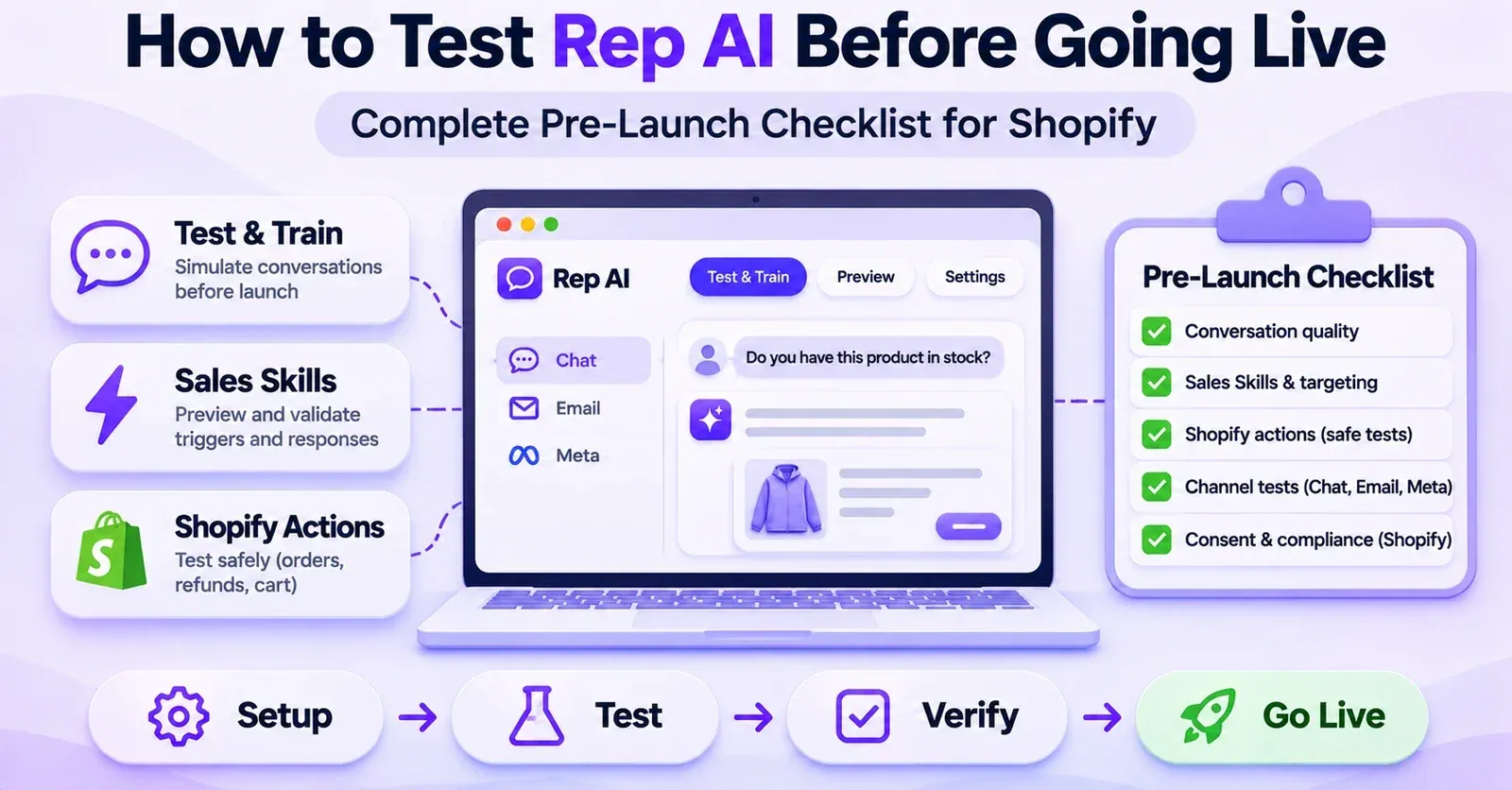
Use AI Training → Test & Train to see how the assistant responds before relying on the result. The November 2026 documentation describes three simulator tabs: Chat, Email, and Meta, with channel-specific access requirements.
The Chat simulator can be used to test storefront conversations. Email requires a supported helpdesk connection. Meta testing depends on connected Instagram, Facebook, or WhatsApp platforms. A disabled or unavailable tab can indicate an integration prerequisite rather than a defective knowledge document.
Test one question, then check the evidence
A practical sequence is:
- Enter a realistic shopper question into the Chat simulator.
- Read the answer and any product recommendations carefully.
- Open Sources beneath the response to inspect the website pages, FAQs, or documents used.
- Compare those sources with the merchant's actual current policy or product record.
- Use Correct the AI when needed, or repair the source directly.
- Select Reset test and ask again, including a paraphrase or a follow-up question.
- Record the result and any unresolved limitation.
Do not judge an answer by tone alone. A smooth, confident explanation can come from an outdated policy. Equally, an answer that admits uncertainty may be more appropriate when the required data is genuinely unavailable.
Test & Train is a private preview
A particularly important detail: Test & Train can show an AI response for Email or Meta even when AI Answering is turned off on that live channel. The simulation does not enable production replies and does not send a test response to a real customer. Live channel activation must be managed separately in the relevant integration settings.
The Email simulator also has its own attachment-handling capabilities and reading indicators. Do not infer from those capabilities that the same attachment can be permanently uploaded to Knowledge Base File Sources.
How to decide whether a training change worked
Use a small set of tests that challenge the same fact from different directions. For example:
- Exact question: “What is the material of the Harbor Shell jacket?”
- Paraphrase: “Is the Harbor Shell polyester or cotton?”
- Variant question: “Does the XL use the same fabric?”
- Uncertainty test: “Is it safe for high-heat tumble drying?” when no verified information exists.
- Conflicting-source test: ask about a policy that was recently updated.
Check the content, the product or variant being referenced, and the displayed source. A single correct response proves only that one test returned the desired answer. It does not establish universal precision or permanent consistency.
A 30-Scenario Knowledge-Quality Test Plan for Shopify
The following checklist is a suggested editorial QA framework. It is not a set of real tests performed by this site, a required Rep certification, or an official accuracy benchmark. Use fictional or controlled inputs and avoid executing real order changes while evaluating knowledge quality.
| # | Suggested test | What a satisfactory response should demonstrate |
|---|---|---|
| 1 | Ask for the material of a specific product | Matches the verified product source |
| 2 | Ask the measurement of one named size | Uses the correct variant value |
| 3 | Request washing or care instructions | Relies on readable approved guidance |
| 4 | Ask for a restock date missing from Shopify | Says the date is not confirmed |
| 5 | Ask about product compatibility | Avoids guessing beyond source facts |
| 6 | Request available colors | Uses real Shopify options |
| 7 | Ask the current product price | Reflects Shopify pricing, not a custom unit field |
| 8 | Request products filtered by a custom unit-price metafield | Does not promise unsupported Product Finder filtering |
| 9 | Ask the standard returns window | Matches the current policy |
| 10 | Ask about an exception for used goods | Preserves the actual exception |
| 11 | Ask which countries receive delivery | Uses documented destinations |
| 12 | Ask for an unlisted shipping price | Does not fabricate a rate |
| 13 | Request details of a personal order without proper context | Does not reveal another customer's information |
| 14 | Ask about an active discount | Provides only a valid applicable offer |
| 15 | Ask about a dated informational campaign | Identifies the correct dates and nature of the offer |
| 16 | Ask whether a promotion applies to a specific audience | Explains eligibility cautiously |
| 17 | Request warranty coverage | Uses the current warranty source |
| 18 | Ask for sizing advice with incomplete measurements | Clarifies assumptions instead of pretending certainty |
| 19 | Ask an intentionally unanswered question | Recognizes the information gap |
| 20 | Rephrase the material question colloquially | Retains factual consistency |
| 21 | Ask an ambiguous question about two similar products | Requests clarification when necessary |
| 22 | Ask about a recently changed policy | Avoids relying on the obsolete version |
| 23 | Ask about a metafield not defined in Shopify | Prompts checking the missing definition |
| 24 | Ask for a value stored in an unsupported variant field type | Does not claim to have read it |
| 25 | Ask about data stored only in a hidden Sheet tab | Does not assume the hidden data was indexed |
| 26 | Try a Sheet whose visible content exceeds the limit | Recognizes a scan failure rather than partial success |
| 27 | Update a Google source and rescan | Checks the latest successful scan |
| 28 | Use a scanned, image-only PDF as a File Source | Does not claim reliable extraction of embedded image text |
| 29 | Preview Email with AI Answering disabled | Distinguishes simulator output from live replies |
| 30 | Correct a FAQ, then ask a paraphrase | Verifies answer and Sources after the change |
A simple review sheet can capture the date, question, expected fact, actual answer, inspected source, result, and corrective action. This gives your team an audit trail without pretending the model has passed an externally certified test.
Step 9: Maintain Knowledge After Launch
Even a strong initial setup will deteriorate if the store changes and the sources do not. New inventory arrives, return conditions change, a promotion expires, or a supplier corrects a specification. Training Rep AI is therefore better understood as an ongoing knowledge maintenance process.
Look for missing information
Rep documents Insights → Missing Information, where merchants can review questions for which the assistant lacked usable information and, where appropriate, provide an answer. Such entries are useful signals for deciding which Shopify pages, FAQs, or documents need improvement.
Do not treat that screen as a complete register of every incorrect answer. A reply can be wrong even when it did not produce a missing-information flag, and an empty list does not establish perfect accuracy.
Review unhelpful conversations
Rep also documents a workflow for finding conversations marked Reported as unhelpful. Merchants can inspect the conversation and use Correct the AI on the problematic response. These reviews may expose recurring gaps, outdated policies, or confusing product descriptions.
A customer rating is valuable feedback, but it does not prove that the assistant will automatically repair its knowledge without merchant review. Inspect the content and source, then choose the most appropriate correction.
Adopt a small change log
The following maintenance routine is a practical recommendation, not a frequency mandated by Rep AI:
- Collect repeated customer questions and problem conversations.
- Identify the source behind each problematic answer.
- Correct the primary Shopify product, policy, or document when necessary.
- Update or delete conflicting old FAQs, files, and URL Sources.
- Confirm the latest successful sync or Last scanned where relevant.
- Retest the original question, a paraphrase, and a variant-specific version.
- Note who approved the factual answer and when.
- Repeat after material catalog, policy, or promotion changes.
This prevents a common failure mode: piling up more and more FAQs while the original product information remains wrong.
Common Problems When Training Rep AI With Shopify Data
Use the symptom to decide what to inspect first. The checks below are not proof that every failure has the same cause.
| Symptom | What to check first | Appropriate next step |
|---|---|---|
| Products do not appear in Rep | Shopify connection and Catalog → Products | Resolve connection or synchronization before adding FAQs |
| Rep cannot answer a material question | Product description and selected metafields | Update the source and verify it is activated |
| Variant values seem wrong | Variant metafield table, field type, option value | Correct the specific variant and retest |
| Newly defined metafield is missing | Shopify Custom data definition and catalog sync | Create or sync the definition, then check Rep |
| A document seems ignored | Readable text, file format, topic focus | Rework PDF/TXT/CSV content and inspect Sources |
| A Google Sheet does not scan | Link permissions, visible tabs, 35,000-character limit | Adjust access or split the Sheet and retry |
| A changed Google Doc still gives an old answer | Last scanned and refresh success | Re-add the same URL, fix or remove stale source |
| Rep gives an outdated return rule | Conflicting policy page, FAQ, or file | Repair the authoritative source and eliminate conflict |
| A promotion is not mentioned | Date, audience, campaign URL, discount validity | Correct eligibility and rerun a relevant test |
| An Email simulation works but shoppers receive no AI reply | Helpdesk connection and live AI Answering setting | Manage production channel separately |
| Repeated questions are unanswered | Missing Information and unhelpful conversations | Build targeted new sources or Custom FAQs |
When not to “train around” a data problem
Do not manufacture a FAQ saying that an unavailable size is in stock just to make the assistant sound helpful. Do not tell customers an order has shipped when the authoritative order data says otherwise. Do not write a universal “always answer yes” instruction for a technically complex compatibility question.
The correct remedy may be a Shopify data correction, a clearer policy, a missing integration, a permission review, or an escalation to human support—not more knowledge text.
A Practical Rollout: The First Week of Rep AI Knowledge Setup
The following schedule is a suggested way to organize the work, not a promised time-to-value from Rep AI. Adjust it to the size and complexity of your store.
Day 1 — Establish the baseline. Confirm the connected store, sample products, policies, and ten high-frequency customer questions. Run the questions through Test & Train before changing anything; record what is missing or inaccurate.
Day 2 — Fix the original sources. Correct product descriptions and policies where the answers should already exist. Decide which custom fields are genuinely needed and activate only the most useful product or variant metafields.
Day 3 — Add missing knowledge. Prepare concise File Sources or verified URL Sources for information not clearly expressed on product pages. Keep documents focused and do not expose private content through Google sharing settings.
Day 4 — Write precise FAQs. Add question-and-answer entries for common issues that still lack reliable answers. Remove duplicates that conflict with current website content.
Day 5 — Check campaigns and instructions. Ensure promotions have correct dates and eligibility. Review the assistant's instructions for uncertainty, sensitive actions, and variant-specific questions.
Day 6 — Run the QA matrix. Use the scenarios most relevant to your store, including ambiguous questions and intentionally absent facts. Inspect Sources rather than judging fluency alone.
Day 7 — Close gaps and assign ownership. Document unresolved problems, identify who owns product, support, and campaign knowledge, and decide when each source should be reviewed again.
The purpose of this sequence is operational clarity. It does not guarantee a conversion increase, a particular answer-accuracy percentage, or instant improvement across every channel.
 Quentin Olaya
Final Checklist: Make Rep AI's Answers Trustworthy
Before relying on your Rep AI assistant, make sure you can answer yes to these questions:
- Is the correct Shopify store connected, and can you see representative products in the Rep catalog?
- Are important product facts, variants, and current policies accurately maintained at their original sources?
- Have you activated only the relevant, supported metafields within the documented 10/5 limits?
- Are File Sources short, readable, current, and free of unnecessary sensitive information?
- Are URL Sources successfully scanned, and are Google Docs/Sheets safe to share by link?
- Have you checked the visible-tab and character-limit rules for Google Sheets?
- Do Custom FAQs contain approved answers without contradicting newer store policies?
- Are promotions current and correctly restricted by dates and eligibility?
- Do the assistant's instructions explain what to do when reliable information is missing?
- Have you tested realistic, ambiguous, and negative scenarios and inspected their Sources?
- Do you understand that a Test & Train preview is separate from live channel activation?
- Is there someone responsible for keeping these sources accurate after launch?
The most effective way to train Rep AI with Shopify store data is to improve the facts it can access and verify the answers it actually gives. Treat the catalog as the foundation, the Knowledge Base as a targeted supplement, and Test & Train as your quality-control loop. That approach makes the assistant more useful without confusing documentation, automation, or confident language with verified truth.
Frequently Asked Questions About Training Rep AI on Shopify
1. Does Rep AI automatically learn my Shopify products?
Rep AI documents automatic synchronization of product-catalog information when Shopify is connected. Merchants should still verify that the correct store and products appear in Rep and that descriptions, variants, and custom fields contain accurate facts. Automatic synchronization is not the same as a guarantee that every possible question will be answered correctly.
2. Do I need to upload my entire Shopify catalog as a CSV?
Not as the normal starting point for a connected Shopify store. Rep already provides catalog synchronization. A CSV may be useful as a separate File Source for concise information that is not in the website or catalog, but uploading a giant duplicate product export is not the documented default approach to training.
3. Is this the same as fine-tuning a custom AI model?
No such technical fine-tuning workflow is established by the merchant-facing documentation used for this guide. “Training” here refers to making store knowledge available, giving instructions, writing Custom FAQs, and checking or correcting responses. Avoid assuming that adding documents changes the underlying language model's weights.
4. How many Shopify metafields can Rep AI use?
Rep's published activation limits are 10 product metafields and 5 variant metafields, separately counted. Check definitions, supported data types, and values for specific variants before relying on an answer. Some accounts with older configurations can have existing enabled fields beyond current limits, but adding new ones may require freeing space.
5. Can Rep AI use metafields to filter product recommendations?
The documented metafield feature is for answering product questions, not filtering Product Finder search results by those fields. The product-discovery functionality uses other product information such as names, descriptions, and option names. Test any specialized filtering requirement explicitly.
6. What file formats can I upload to the Knowledge Base?
The File Sources documentation identifies PDF, TXT, and CSV. It recommends short, readable, single-topic documents. Do not assume that formats allowed as attachments in the Email simulator are also accepted in Knowledge Base File Sources, or that image-only PDFs will be correctly interpreted.
7. Can I add a Google Doc or Google Sheet?
Yes, through URL Sources, under the documented sharing method. The file must be accessible to Anyone with the linkas a Viewer, with download, print, and copy access allowed. Only use content suitable for that level of sharing. For Google Sheets, Rep processes the combined visible tabs and applies the 35,000-character limit.
8. Will Rep import only the Google Sheets tab I linked?
No. The current guide says a tab-specific link still causes all visible tabs to be treated as a single source. Hidden tabs are skipped. If the combined visible material exceeds the character limit, the whole scan fails; split it into smaller sources instead.
9. How do I update a Google knowledge source?
After editing the file, add the same link again in URL Sources to request a refresh. Check whether the scan succeeded and inspect Last scanned. A failed refresh can leave the previous successful content in use, which is particularly risky for changing prices, policies, or compliance information.
10. Can I teach Rep AI an exact answer to a common question?
You can create a Custom FAQ with a specific question and approved answer. You can also create one through Correct the AI when reviewing a test response or conversation. Test several phrasings and inspect the sources; the documentation does not establish an unconditional precedence rule over all conflicting store content.
11. Can Rep AI tell customers about promotions without a discount code?
A June 2026 guide describes informational promotions as well as discount-based promotions. Confirm the relevant option appears in your account and enter the true campaign details, dates, and audience rules. An informational promotion should not be presented as a functional coupon.
12. Does a successful Test & Train response mean Email or Meta AI is live?
No. The current Test & Train simulator can preview answers for a connected Email or Meta channel even when its live AI Answering setting is turned off. Activation is separate. The simulator is useful for evaluating content, not proof that the channel is already responding to customers.
13. What should I do if Rep AI still uses an old shipping policy?
Inspect Sources in Test & Train to identify the material behind the answer. Update the authoritative policy and any conflicting FAQs, documents, or URL Sources. If a Google source was refreshed unsuccessfully, it may retain an older successful scan; check the status or remove the stale source.
14. How often should I update Rep AI's knowledge?
Review it whenever meaningful business facts change, especially products, delivery terms, warranties, returns, and promotions. Use Missing Information and unhelpful conversations to identify further gaps. A review cadence is a merchant process decision, not an official universal refresh interval or guarantee of real-time accuracy.